Installation
Package installation
Using pip
Generate the virtual environment on your project folder:
# Generate local python binaries in folder
python3 -m venv pyreslib-env
Activate virtual environment in order to invoke the package:
# activate the environment for this terminal
source pyreslib-env/bin/activate
pip install pyreslib
Using uv
Do not forget to include the pyproject.toml file in your project directory. You can find a copy of the file in our GitHub repository.
Generate the virtual environment on your project folder:
# Generate local python binaries in folder
uv venv pyreslib-env
Activate virtual environment in order to invoke the package:
# activate the environment for this terminal
source pyreslib-env/bin/activate
uv add pyreslib
Python for Windows and Mac users
Have a look at this detailed documentation.
Data structure
MARC and JSON records
The package suppose a specific folder structure for credentials, mappings files and data paths. You can easily clone our GitHub repository and copy the relevant directories to your projec folder.
git clone https://github.com/NicholasCorniaOrpheus/py-resounding-libraries.git
Create a data folder with subfolders koha_auth and koha_biblio. For both authorities and biblionumbers, make subdirectories marc and json.
your_project
├── data
│   ├── credentials
│   │   └── credentials.json
│   ├── koha_auth
│   │   ├── csv
│   │   ├── json
│   │   └── marc
│   ├── koha_biblio
│   │   ├── csv
│   │   ├── json
│   │   └── marc
│   ├── kraken
│   │   ├── models
│   │   │   └── catmus-large
│   │   │       ├── catmus-print-fondue-large.mlmodel
│   │   │       └── metadata.json
│   │   └── transcriptions
│   ├── mappings
│   │   ├── abbreviations
│   │   │   ├── item_types.json
│   │   │   ├── languages.json
│   │   │   ├── musical_instruments.json
│   │   │   └── relationships.json
│   │   ├── bibtex
│   │   │   ├── country_codes.csv
│   │   │   ├── koha_entry_types.json
│   │   │   └── role_codes.csv
│   │   ├── external_sources
│   │   │   └── external_sources.json
│   │   ├── google
│   │   │   └── google_books-koha_mapping.csv
│   │   ├── koha
│   │   │   ├── authority_list.csv
│   │   │   └── biblio_list.csv
│   │   ├── lod
│   │   │   ├── external_identifiers.json
│   │   │   ├── koha-rdf_mapping-auth.csv
│   │   │   ├── koha-rdf_mapping-biblio.csv
│   │   │   └── rdf_namespaces.json
│   │   ├── omekas
│   │   │   ├── biblionumber_barcode.csv
│   │   │   ├── koha-omekas_mapping - auth.csv
│   │   │   ├── koha-omekas_mapping - biblio.csv
│   │   │   ├── koha-omekas_mapping - locations.csv
│   │   │   ├── koha-omekas_mapping - media.csv
│   │   │   ├── koha-omekas_mapping - projects.csv
│   │   │   ├── koha-omekas_mapping - researchers.csv
│   │   │   └── koha-omekas_mapping - research_groups.csv
│   │   └── wikidata
│   │       ├── authority_wd_list.csv
│   │       ├── wd_authority_list.csv
│   │       └── wikidata-koha-properties.csv
│   ├── rdf
│   │   ├── auth
│   │   └── biblio
│   └── wikidata
│       ├── backup_auth
│       ├── changed_auth
│       ├── qid_log
│       └── statistics
Credentials
In your data folder you should create a credentials directory to store all your sensible data. All credentials are stored in credentials.json file. Copy the credential template from our GitHub repository.
Mappings
Create a data/mappings folder in order to store all mappings between your Koha instance and other external services, such as Wikidata, Google Books, Omeka S and Resource Space. You can copy the mapping templates from our GitHub repository and modify them accordingly.
Koha Setup
- Generate Client ID and Secret Key for your Koha admin user according to the official documentation.
- Create reports according to the Reports section.
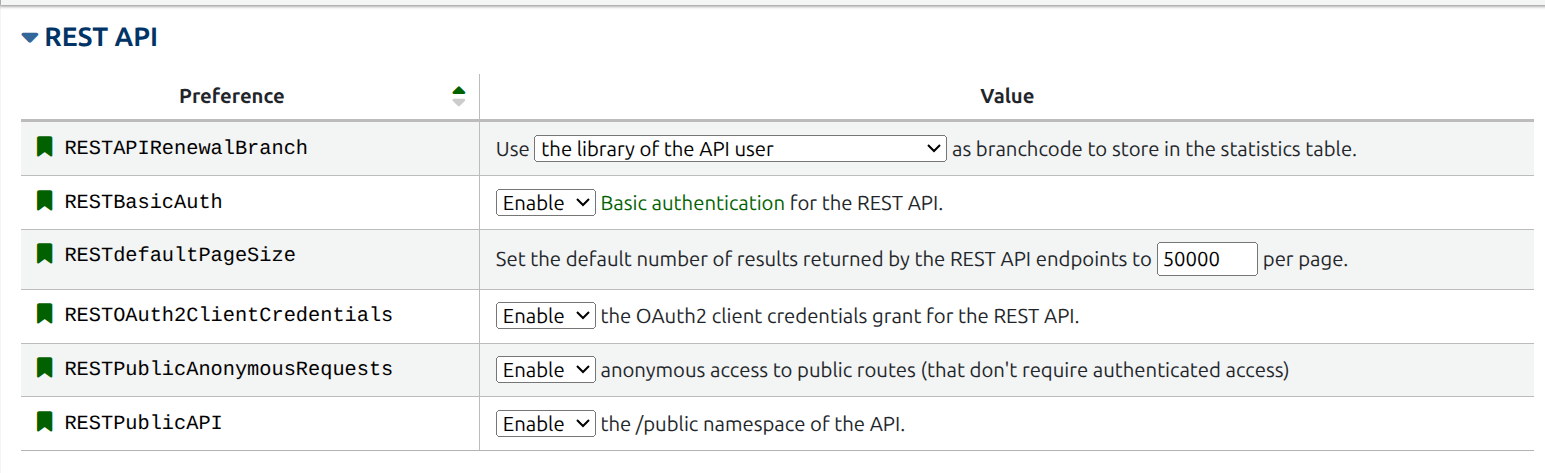
- Allow REST API preferences from Koha Administration panel accessible via
https://{your_koha_staff_url}/cgi-bin/koha/admin/preferences.pl?tab=web_services#web_services_REST_API.